
Installation and commissioning
Instructions for installation and commissioning.
Product Identification
Product designation | Item No. | E-number (SE) (sv) |
|---|---|---|
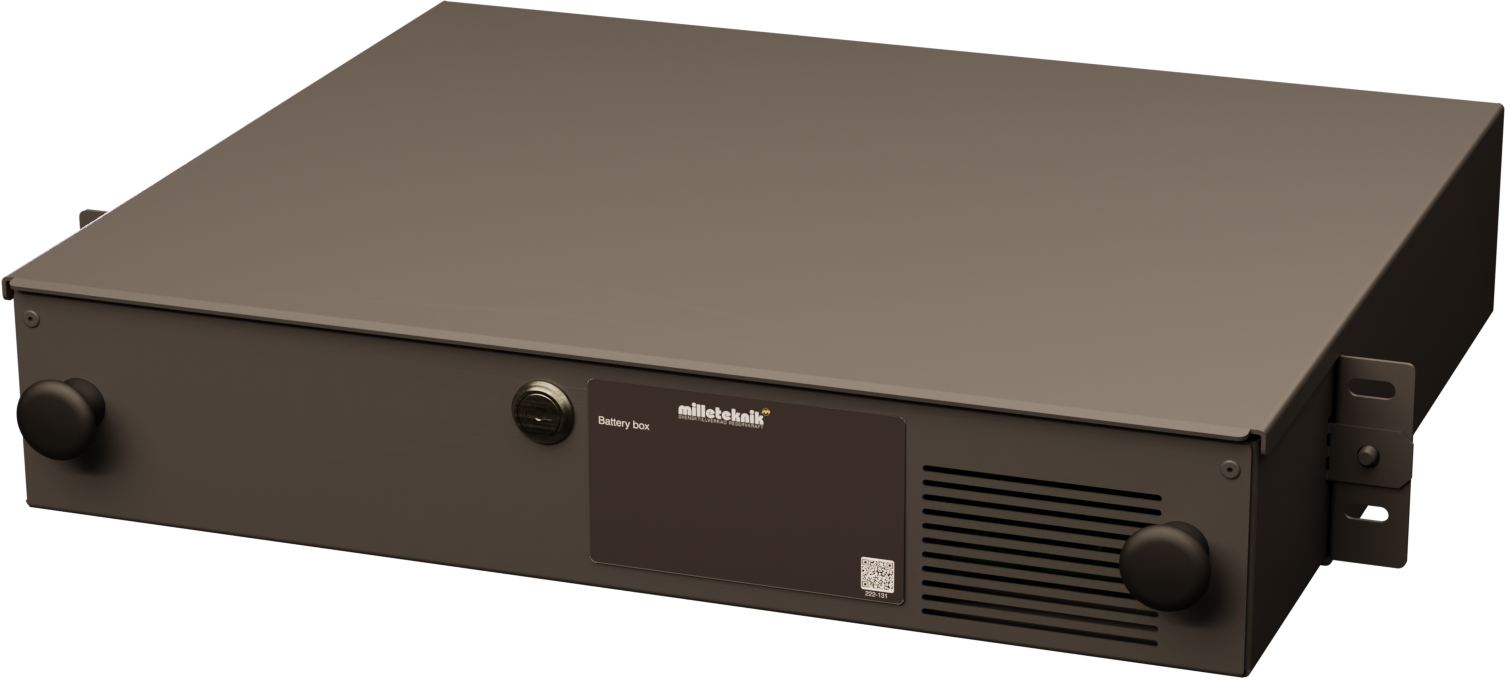
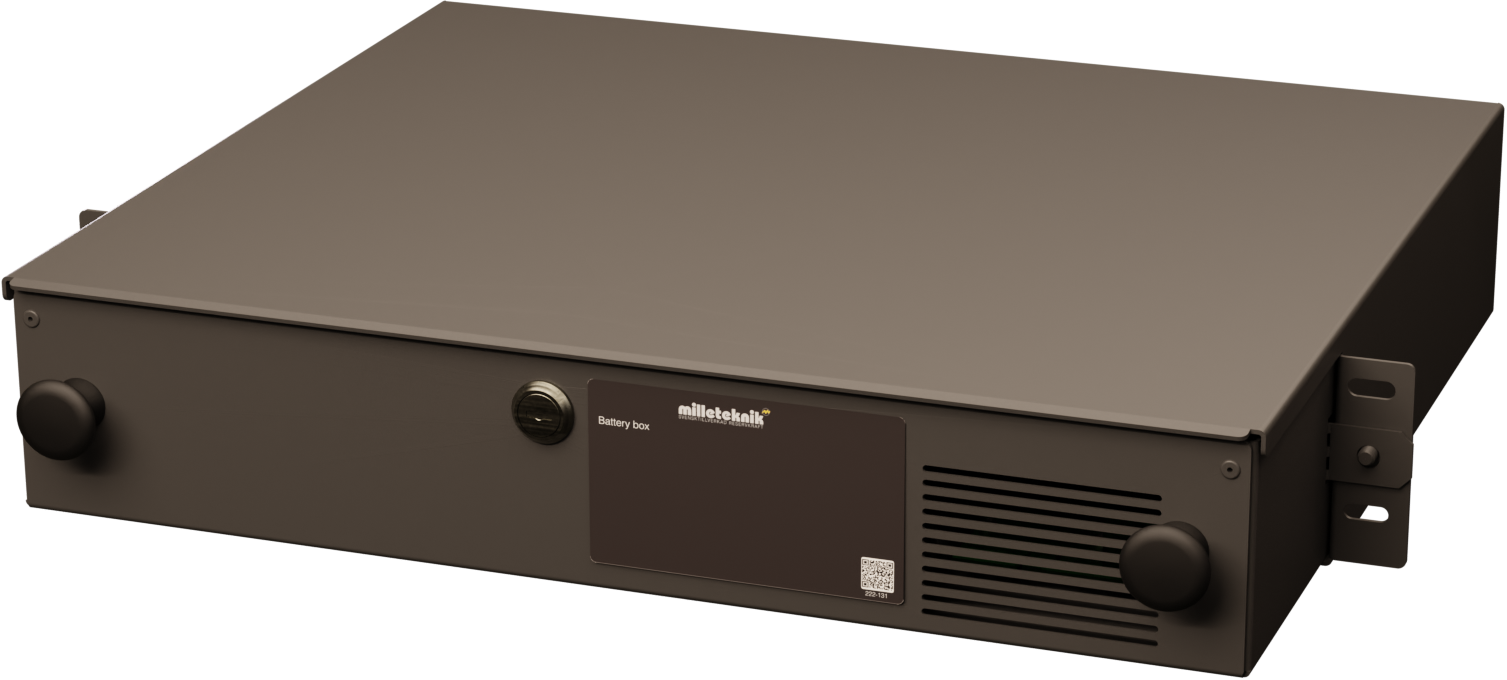
Large Battery Cabinet 24V 2HE | 2U02000024BB01 | 52 137 93 |
Product image
Technical description
Rack-mounted battery box in 2 HE with space for 4 × 12 V 20 Ah batteries, intended as an expansion unit for battery backup systems. Enables extended battery capacity while maintaining compact installation height in 19" rack
Revisions and the edition of this document
The current and most recently published edition of this document is available at www.milleteknik.com.
The validity of this document can not be guaranteed, as new editions are published without prior notice.
Original instructions for use: Swedish.[1].
Instructions for use, technical data and translations thereof may contain errors. It is always the responsibility of the installer to install the product in a safe manner.
Symbols
Symbols | Name | Explanation |
|---|---|---|
 | Warning | Risk of electric shock, improper installation or hot surfaces. Appears in some manuals |
 | Note | Used for supplementary information that clarifies the text. |
 | Caution/Important | Indicates the risk of equipment damage or malfunction. Also used for information that is important but not security-related |
 | Tips | Displays practical advice or shortcuts for installation, operation, or service. |
 | CE marking | The product complies with applicable EU directives and harmonised standards. |
 | Read the manual | Please read manual before installation and service. |
 | Do not dispose of in household waste | The product is covered by the WEEE Directive and must not be disposed of with household waste, it must be recycled and delivered to a recycling centre. |
 | Recycling | Packaging, products and other materials that do not contain electronics must be recycled in accordance with local environmental regulations. |
Enclosures
General assembly instructions
Indoor mounting in 19" rack
The product should be mounted in a standardized 19" rack or cabinet with sufficient carrying capacity for the weight of the enclosure including batteries.
The device should be mounted at a comfortable working height, normally between 1.4 and 1.8 m.
The device is mounted horizontally in the rack with the included rack ears or corresponding brackets.
Check that the rack posts are properly aligned and that the spacing corresponds to the 19" standard (465—470 mm between the inner edge of the posts).
When assembling, cage nuts or locking washers should be used to ensure that the screws fit securely.
For good ventilation, at least 100 mm of free space should be provided above and below the unit. Do not block the air flow on the front or back.
Batteries should always be placed as directed and must not block ventilation openings or wiring.
Installation shall be carried out in accordance with the applicable installation rules and by a competent installer.
Mounting
Use the appropriate screw for mounting on a wall or in a 19" rack. Screws for mounting on a wall or in a rack are not included.
For wall mounting in concrete, concrete screws must be used. For rack mounting, M6 with basket nut is used
Screw length should be adjusted according to wall material and load. The specified screw length is the minimum allowable length
Mounting holes, spacing and ø.
Weight with batteries
Net weight without batteries | Battery type | Number | Batteries/weight per piece | Weight with batteries |
|---|---|---|---|---|
5.0 kg | 20 Ah | 4 | 6.0kg | 29 kg |
Mounting the 19" rack box
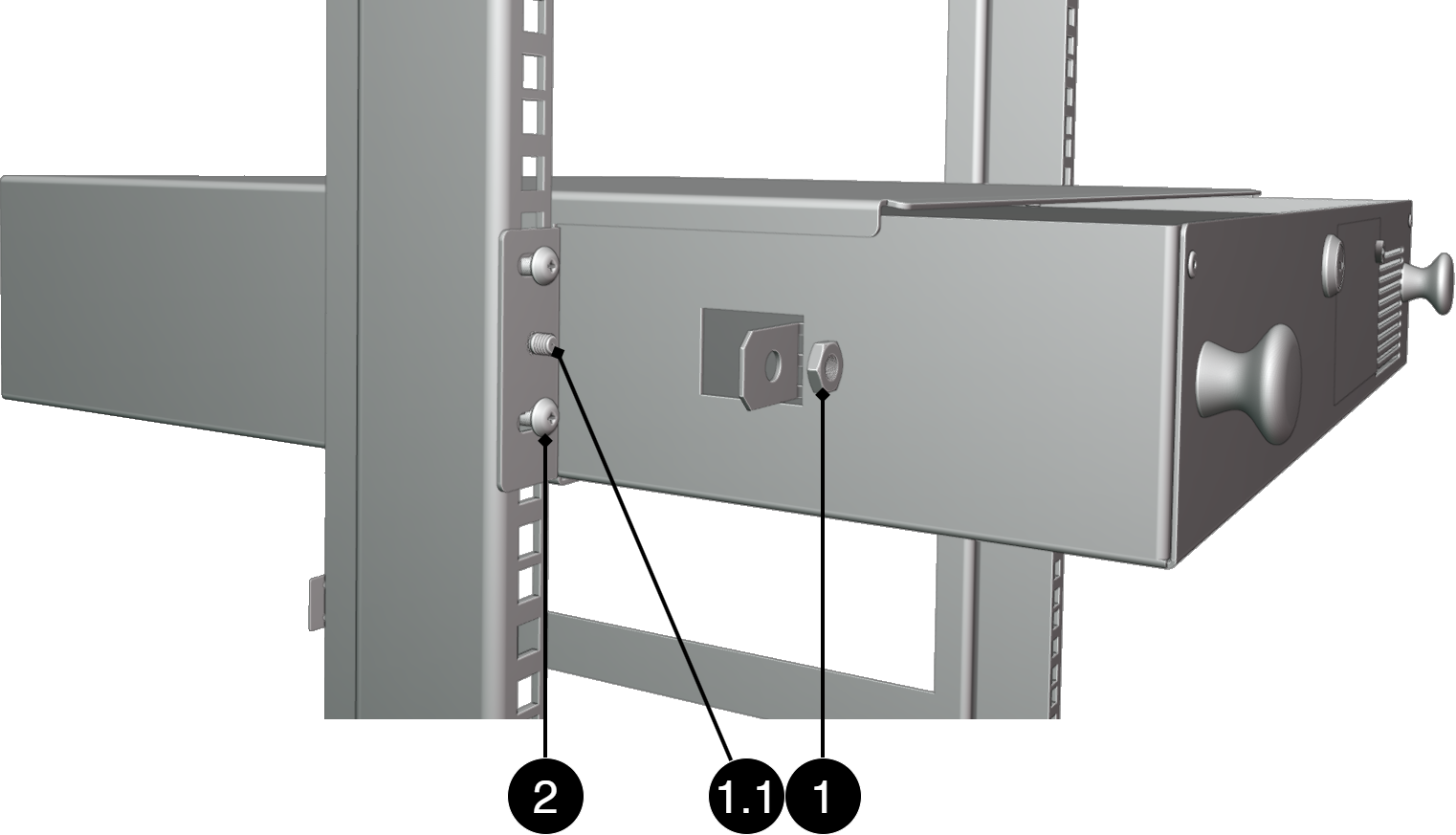
Check that the cover is fastened with the supplied nuts.
Place the box in the desired position in the 19" rack.
Screw the box on both sides into the rack profile with screws designed for 19" racks.
Warning
Do not insert the batteries until the rack box is properly assembled and securely attached to the rack. The weight of the batteries can make the box unstable if it is not properly bolted
No. | Explanation |
|---|---|
1, 1.1 | Nut for fastening caps. Nut included |
2 | Screw for mounting in 19" rack. Screws are not included. |
Component overviews
Component Overview
No. | Explanation |
|---|---|
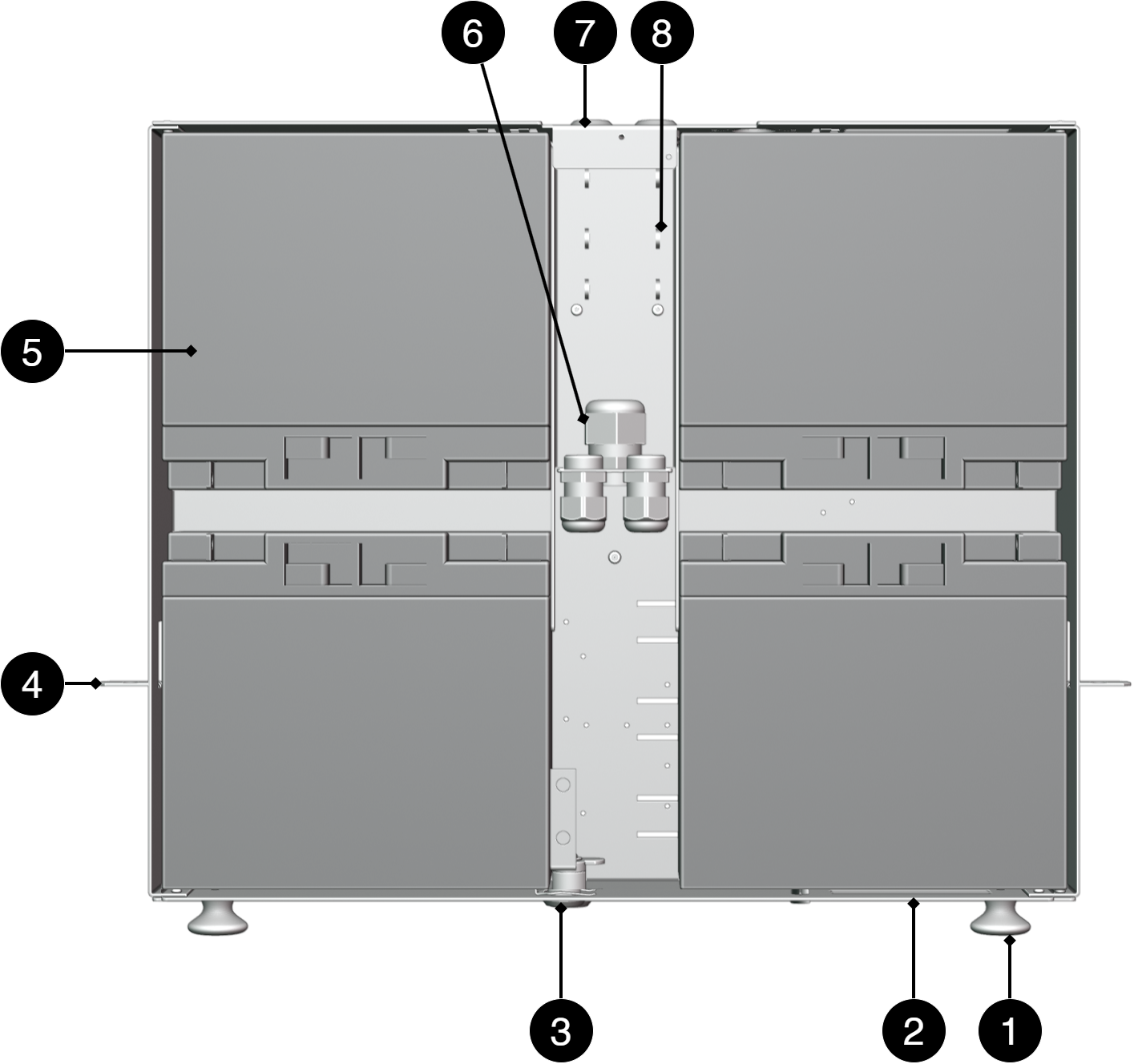
1 | Knob to pull out the box. |
2 | Enclosure sheet. |
3 | Lock. |
4 | Bracket for nut in 19" rack stand. |
5 | Place for batteries. Batteries are not included but ordered separately |
6 | Strain relief for wiring. |
7 | Cable grommets. |
8 | Place for cable ties to strip cable. |
Batteries - placement and connection
Battery connection between drawer units
Important
Observe caution when connecting batteries. The batteries are located with the poles facing each other, which means there is a risk of short circuit if the battery terminals or connecting cables come into contact with each other.
Press the cable lug against the battery terminal to reduce the risk of short circuit.
Do not pull out the box more than halfway when assembling batteries.
The batteries are connected in series to provide the correct system voltage to the battery backup. Each battery pair consists of two 12 V batteries that connect from the minus pole of one battery to the plus pole of the other battery. This provides 24 V DC.
Wiring from the motherboard connects to the free plus and minus poles of the batteries. Between batteries and between drawboxes, double-pin wiring is used. The double pins are used where both the battery cables and the forward connection to the next battery or the next drawer are to be connected on the same battery terminal
The battery fuses shall be installed only when all batteries and cables are properly connected and the polarity has been checked.
Coupling principle
Slide the two rear batteries in first.
Connect the fuse cable to the pole of the rear batteries as shown.
Connect the short cable to the other pole.
Place the front batteries in the box.
Connect the short cable to the battery cone as shown.
Connect the second cable from the fuse.
Connect the wiring from the motherboard to the batteries in the first drawer.
Connect call forwarding cables from the first drawbox to the next drawbox.
Check that the plus is connected to the plus and minus to the minus according to the marking in the picture.
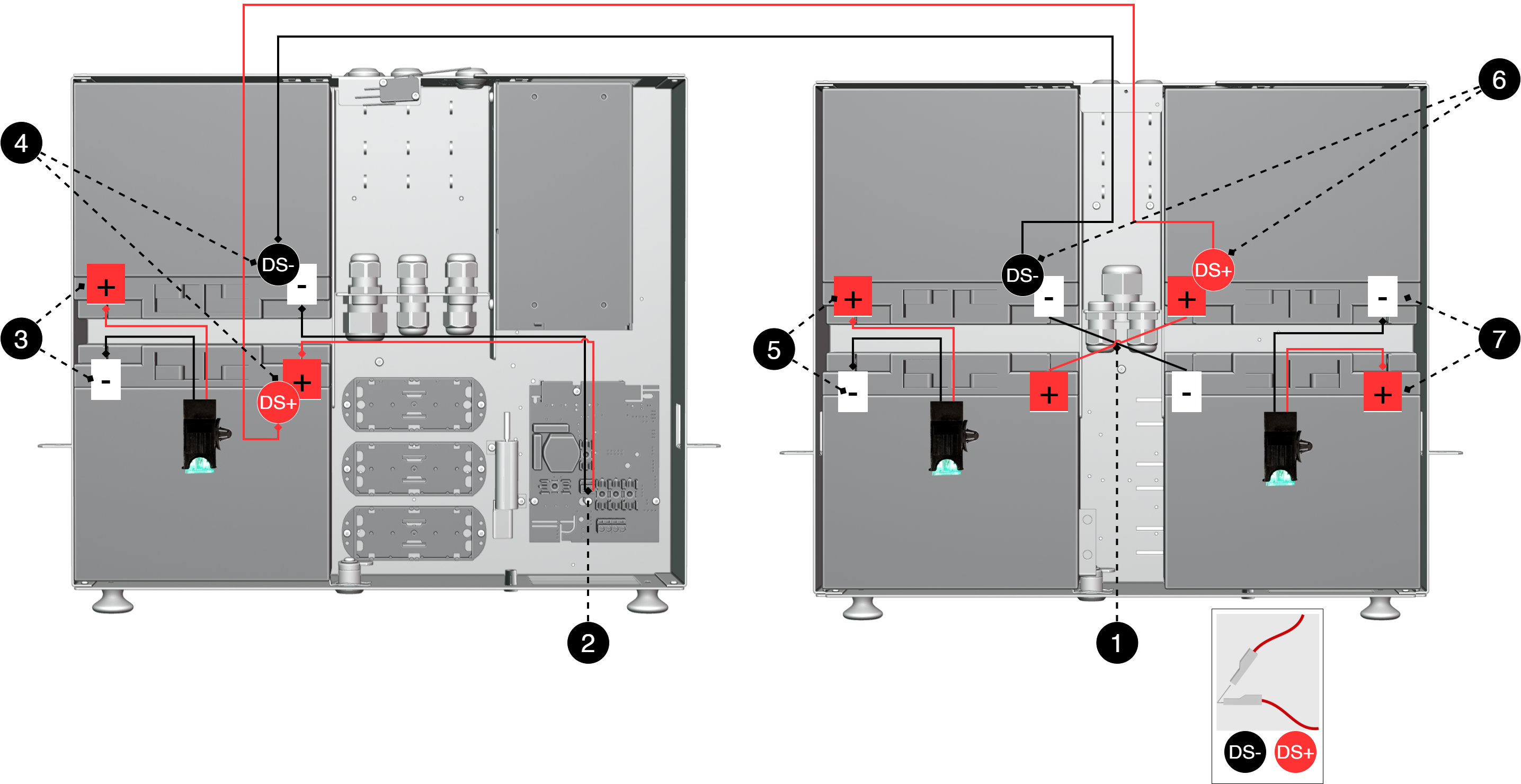
Designation | Explanation |
|---|---|
1 | Serial connection cable between the minus pole of one battery and the minus pole of the next battery. Plus should be linked in the same way |
2 | Battery cables from motherboard to batteries. |
3, 5, 7 | Battery fuse. Assembled only after the batteries are properly connected |
4, 6 | Call forwarding cables between batteries/drawers. Connects with double pins |
DS+ | Double pin for plus connection. |
DS - | Double pin for minus connection. |
Deployment
The battery box is put into operation together with the battery backup when the batteries are properly connected and the battery fuses are fitted.
Check the polarity and all connections before installing the battery fuses. When the battery backup is energized, the batteries are automatically charged. It can take up to 72 hours for the batteries to be fully charged
Maintenance
Safety Information - Service and Troubleshooting
If possible, disconnect the mains supply before starting any work, such as servicing, battery replacement, metering or troubleshooting.
Remove the battery fuse/plug before working on the DC side.
Check that all cables are properly connected and grounded before re-energizing the unit.
The product may contain components that become hot during operation. Avoid touching internal parts immediately after the power has been switched off.
If fuses blow repeatedly see Troubleshooting or disconnect the unit and contact Milleteknik technical support.
In case of suspicion of damage, liquid ingress or burnt odour, the product must not be used until it has been inspected by qualified personnel.
During operation, the housing should be closed and locked (if the device has a lock).
Only authorized service personnel may perform repairs on the device.
Use only original fuses and batteries of the same type and value as specified in the manual/product sheet.
Milleteknik is not responsible for damage caused by improper handling, modification or unapproved components.
Troubleshooting
If the device does not work as expected, go through the following checks:
Trouble | Possible cause | Action |
|---|---|---|
Battery alarm is displayed on the battery backup. | The battery box is not connected correctly, battery fuse is missing or the polarity is wrong. | Check battery cables, polarity and battery fuses. |
Battery does not charge. | The battery fuse has failed, the battery cable is connected incorrectly or the contact between the battery box and the battery backup is broken. | Check fuses, wiring and connection between battery box and battery backup. |
Short backup operation time. | The batteries are not fully charged, aged or have the wrong capacity. | Allow the batteries to recharge. It can take up to 72 hours for the batteries to be fully charged. Check the condition of the batteries if necessary |
Fuse dissolves. | Short circuit, wrong polarity or incorrectly connected battery cable. | Break the voltage and check the wiring and polarity before replacing the fuse. |
The battery backup does not start on battery operation. | Batteries or battery box are not connected, batteries are discharged or battery fuse is missing. | Check battery voltage, battery fuse and connection to the battery backup. |
Control measurement of batteries
In case of troubleshooting, the voltage of the batteries can be checked using a multimeter. Measure each 12V battery separately over the plus and minus pole. Next, measure the entire battery group connected in series. Two 12 V batteries connected in series should provide approximately 24-27 V DC depending on the degree of charge and whether charging is in progress. If measured voltage is significantly lower than expected, check polarity, battery fuse and wiring between battery box and battery backup.
If the problem persists after these checks, contact Milleteknik support and provide the product name, serial number, and a brief description of the fault.
Product sheet - power supply / battery backup
Product Sheet
Product image
Item Information
The table shows the name, part number and email number of the product
Product Identification
Product designation | Item No. | E-number (SE) (sv) |
|---|---|---|
Large Battery Cabinet 24V 2HE | 2U02000024BB01 | 52 137 93 |
Technical description
Rack-mounted battery box in 2 HE with space for 4 × 12 V 20 Ah batteries, intended as an expansion unit for battery backup systems. Enables extended battery capacity while maintaining compact installation height in 19" rack
Areas of application
Areas of application | Yes | No |
|---|---|---|
To extend standby time on compatible power supplies with larger battery packs | ✔ | |
Used to expand battery capacity in rack-mounted battery backups | ✔ |
Battery
Enclosure and Mechanics
Enclosure and Mechanics | |
|---|---|
Type | Enclosure for 19" rack |
IP class | IP20 |
Material | |
Colour | Black |
Height units | 2 |
Cable grommets | 6 pcs |
Lock | ✔ 2 keys included |
Fan in enclosure | ✘ |
Assembly, installation and eligibility requirements
Fitting | Yes | No |
|---|---|---|
19" rack. | ✔ |
Installation | Yes | No |
|---|---|---|
Fixed installation. | ✔ |
Dimensions, weight and packaging information
Net weight | Weight with packaging |
|---|---|
5.0 kg | 5.3 kg |
Packaging | |
|---|---|
Packaging |
|
Quantity in pack | 1 pc. |
Packaging Type (GS1 T0137) | BX box. |
Conditions EUR pallet | EUR pallets may not be stacked during transport or storage. Stacking may result in damage to product and packaging |
Transport environment | The product must be protected from condensation and direct precipitation during transportation. |
Transport temperature (without battery) | −30 °C to +70 °C |
Storage environment | Dry indoor environment, protected from condensation. Relative humidity: max 95%, non-condensing |
About this information
All information is published subject to possible errors. Information is updated without prior notice. |
Publication date 2026-06-29
Compliance and regulatory compliance
Delivery time, warranty and terms
Delivery time, warranty and terms | |||||||||||||||||||||||||||||||||||||||||||||||||
|---|---|---|---|---|---|---|---|---|---|---|---|---|---|---|---|---|---|---|---|---|---|---|---|---|---|---|---|---|---|---|---|---|---|---|---|---|---|---|---|---|---|---|---|---|---|---|---|---|---|
Warranty period[a] | The product has a two (2) year warranty against manufacturing defects. | ||||||||||||||||||||||||||||||||||||||||||||||||
Special warranty conditions | See also general terms and conditions. | ||||||||||||||||||||||||||||||||||||||||||||||||
General Terms and Conditions | ALEM09 with exceptions, see: www.milleteknik.se/conditions/ | ||||||||||||||||||||||||||||||||||||||||||||||||
Support | Telephone support and email support during the warranty period are free of charge. For spare parts that are not covered by warranty, there is a charge | ||||||||||||||||||||||||||||||||||||||||||||||||
Delivery and stock | |||||||||||||||||||||||||||||||||||||||||||||||||
Delivery time[b] | Or as per agreement. Delivery from factory, transportation time is added. | ||||||||||||||||||||||||||||||||||||||||||||||||
[a] If the device is purchased through a wholesaler or other supplier, other warranty conditions may apply [b] In the case of larger orders, delivery time increases, acc. to agreement. | |||||||||||||||||||||||||||||||||||||||||||||||||
Operation and maintenance
Operation | Data | Other. info | |||||||||||||||||||||||||||||||||||||||||||||||
|---|---|---|---|---|---|---|---|---|---|---|---|---|---|---|---|---|---|---|---|---|---|---|---|---|---|---|---|---|---|---|---|---|---|---|---|---|---|---|---|---|---|---|---|---|---|---|---|---|---|
Environment | |||||||||||||||||||||||||||||||||||||||||||||||||
Operating temperature (recommended) | +15°C to +25°C | ||||||||||||||||||||||||||||||||||||||||||||||||
Operating temperature (permissible)[a] | +5°C to +40°C | Class 1 according to EN 50131-6/ EN 60839-11 | |||||||||||||||||||||||||||||||||||||||||||||||
Ventilation, in front and behind the enclosure. | 100 mm | Ventilation openings must not be blocked or covered. | |||||||||||||||||||||||||||||||||||||||||||||||
[a] Specifies the permissible ambient temperature range in which the product can operate without damage. See also table on battery life. | |||||||||||||||||||||||||||||||||||||||||||||||||
Yes | No | Interval | Other. info |
|---|---|---|---|
✔ | Annually | Battery terminal voltage must be measured. Ensure that the average load does not exceed 80% of the rated capacity of the power supply. |
Certifications and approvals
Complies with | Directives |
|---|---|
C.E. | CE marking according to (EC) 765/2008 |
EMC | EMC Directive 2014/30EU |
Electric (LVD) | Low Voltage Directive: 2014/35/EU |
Environmental data
Environmental data | J/N | Informație | Other. info. | ||||||||||||||||||||||||||||||||||||||||||||||
|---|---|---|---|---|---|---|---|---|---|---|---|---|---|---|---|---|---|---|---|---|---|---|---|---|---|---|---|---|---|---|---|---|---|---|---|---|---|---|---|---|---|---|---|---|---|---|---|---|---|
Building Product Declaration (BPD) | ✔ | Yes, see iBvd at www.milleteknik.se. | - | ||||||||||||||||||||||||||||||||||||||||||||||
REACH Information Obligation (EC) No 1907/2006 | ✔ | If empty, the product is not covered. | |||||||||||||||||||||||||||||||||||||||||||||||
SVHC substances, CAS/EC | ✔ | For text, see iBvd at www.milleteknik.se. If blank, substance is missing. | |||||||||||||||||||||||||||||||||||||||||||||||
Subject to the RoHS Directive, (EU) 2015/863) | ✔ | ||||||||||||||||||||||||||||||||||||||||||||||||
WEEE 2012/19/EU | ✔ | If empty, the product is not covered. End-of-life products must be returned to a recycling centre | |||||||||||||||||||||||||||||||||||||||||||||||
Battery Regulation (EU) 2023/1542 | |||||||||||||||||||||||||||||||||||||||||||||||||
SCIP No 2008/98/EC | ✔ | If empty, no SCIP number is needed. | |||||||||||||||||||||||||||||||||||||||||||||||
Conflict minerals (EU) 2017/821 | ✗/✗/✗/✗/✗ | No=Gold, Tungsten, Tantalum, Cobalt, Tin. | |||||||||||||||||||||||||||||||||||||||||||||||
Contains nanomaterials: EC 1272/2008 | ✗ | The product does not contain nanomaterials. | |||||||||||||||||||||||||||||||||||||||||||||||
Ecodesign 2009/125/EC | Milleteknik's products are intended for professional use and are therefore not directly covered by the Ecodesign Regulation (EU 2019/1782). As some components may be covered, we nevertheless disclose relevant information[a], where applicable, to provide our customers with confidence in their choice. | ||||||||||||||||||||||||||||||||||||||||||||||||
Machine Directive 2006/42/EC | The product is part of electrical systems, is subject to the relevant electrical and safety directives and is not a machine according to the Machinery Directive (2006/42/EC). Will be replaced by Machinery Regulation (EU) 2023/1230, which will apply in 2027. | ||||||||||||||||||||||||||||||||||||||||||||||||
[a] Standby consumption and power. | |||||||||||||||||||||||||||||||||||||||||||||||||

Manufacturer and country of origin
Appendix
Backup operating time on batteries
The reserve operating time in battery operation depends on how large a load is connected to the power supply. If the load varies, as with frequent opening of door locks, the time that batteries can continue to power the security system decreases. To get an estimate of reserve operating times see: www.milleteknik.se/Manualer/FaQ/Reservdrifttider/
Eligibility requirements, installation
Eligibility requirements vary between countries. The table summarizes national requirements for fixed installation and connection of equipment with a plug socket, respectively.
Options on the secondary side of the product, such as 12 V, 24 V or 48 V DC, are connected according to the respective instructions. Work on the network connection of the product shall be carried out in accordance with national eligibility requirements
Permission Requirements for Installation | Fixed installation (230 V) | Plug | Other. info |
|---|---|---|---|
Sweden | ✔ | ✗ | Fixed installation may be performed by technicians but shall be under the responsibility of a qualified installer. (Electrical Safety Act, SS 436 40 00) Plug may be connected without authorization. |
Norway | ✔ | ✔ | Requirements for qualified electricians also for equipment with a plug socket in fixed installations. (NEK 400, DSB |
Finland | ✔ | ✗ | Plug may be connected without authorization. (Tukes, SFS 6000 |
Denmark | ✔ | ✗ | Plug may be connected without authorization. (Safety Board |
Germany | ✔ | ✗ | All fixed installations require a qualified electrician according to VDE 0100. Plug sockets may be connected without authorization, but only by person with basic electrical knowledge (“Elektrotechnisch unterwiesene Person”) |
Reference table: environmental classes according to EN 50130-5 (referred to in EN 50131-6)
Class | Type | Temperature range |
|---|---|---|
Environmental Class 1 | Heated indoors (type office/residence). | +5°C to +40°C |
Environmental Class 2 | Generally indoors (type warehouses/stairwells, not temperature controlled). | -10°C to +40°C |
Environmental class 3 | Protected outdoors. | -25°C to +50°C |
Environmental class 4 | Generally outdoors. | -25°C to +60°C |
Reference table: manufacturer's stated service life and recommended battery replacement
Battery Type (Design Life)[a] | Battery replacement time in normal operation, +20°C. | Replacement during hot operation, +30°C | Replacement during hot operation, +40°C | ||||||||||||||||||||||||||||||||||||||||||||||
|---|---|---|---|---|---|---|---|---|---|---|---|---|---|---|---|---|---|---|---|---|---|---|---|---|---|---|---|---|---|---|---|---|---|---|---|---|---|---|---|---|---|---|---|---|---|---|---|---|---|
3 - 5 years | 2 - 3 years | 1 - 1.5 years | 0.5 - 0.75 years | ||||||||||||||||||||||||||||||||||||||||||||||
6 - 9 years | 5 - 6 years | 2.5 - 3 years | 1.2 - 1.5 years | ||||||||||||||||||||||||||||||||||||||||||||||
10 - 12 years | 6 - 7 years | 3 - 3.5 years | 1.5 - 1.75 years | ||||||||||||||||||||||||||||||||||||||||||||||
15 + years | 10 - 12 years | 5 - 6 years | 2.5 - 3 years | ||||||||||||||||||||||||||||||||||||||||||||||
[a] Valid in case of completely unused battery stored under optimal conditions. | |||||||||||||||||||||||||||||||||||||||||||||||||
About this information
All information is published subject to possible errors. Information is updated without prior notice. |
Publication date 2026-06-29
Address and contact details
Milleteknik AB |
Ögärdesvägen 8 B |
S-433 30 Partille |
Sweden |
+46 31 340 02 30 |
info@milleteknik.se |
www.milleteknik.com |
[1] Translations in languages other than Swedish are indicative only and not verified. Translation should always be checked against the Swedish original to ensure accurate information